Systems Design · UX for Infrastructure · Data Visualization · Product Architecture
Overview
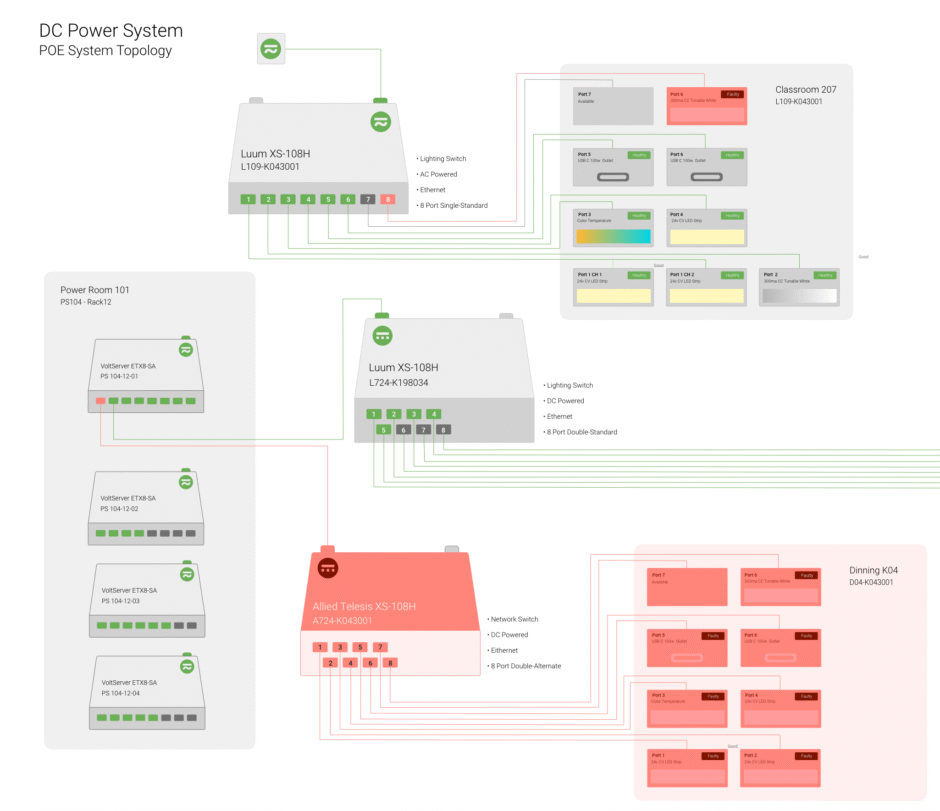
The Digital Power System Interactive Topology project visualizes complex power and networking infrastructure within smart buildings. Designed as part of the Elevated platform, the system translates low-level electrical and network topology into a clear, interactive visual map that supports configuration, monitoring, and troubleshooting.
The goal was to make invisible infrastructure legible—not just to engineers, but to designers, operators, and facility teams working across disciplines.
Project Details
Date: 05/12/2021 – Present
Organization: Elevated Products Group
Role: Project Lead · Product Designer · UX/UI Designer · Software Architect · Data Visualization
Partnership: Sinclair Digital

Design Challenge
Power-over-Ethernet (PoE), DC power systems, and smart building networks are inherently complex. Traditional diagrams are static, fragmented, and difficult to maintain, often limiting understanding to a small group of specialists.
The challenge was:
How do we represent real-world power and data relationships clearly and accurately?
How do we support both high-level understanding and detailed inspection?
How can topology visualization reduce operational friction instead of adding complexity?
Design Approach
The design focused on structural clarity and progressive disclosure.
Key principles included:
Representing physical and logical connections in a single coherent system
Using color, hierarchy, and spatial grouping to communicate power flow and dependencies
Supporting both overview and zoomed-in inspection without visual overload
Designing for change, not just documentation
The topology acts as a living system map rather than a static diagram.
Interaction & System Logic
The interactive topology enables users to:
Trace power and data paths across devices and spaces
Identify dependencies and potential failure points
Understand how hardware components relate to rooms, zones, and systems
Support planning, commissioning, and operational decision-making
Interaction design was deliberately restrained to keep focus on relationships, not decoration.

Collaboration & Integration
This work was developed in close collaboration with:
Hardware partners
Electrical and network engineers
Product and platform teams
The visualization needed to align with real-world constraints, device capabilities, and installation practices—bridging design intent with physical implementation.
Impact & Outcomes
Improved shared understanding across technical and non-technical teams
Reduced ambiguity in system configuration and troubleshooting
Created a scalable visualization model adaptable to different building types
Strengthened Elevated’s platform as a systems-level tool, not just a UI layer
Reflection
This project reinforced the importance of designing for systems, not screens. When infrastructure becomes visible and understandable, teams make better decisions. The work demonstrates how interaction design and visualization can operate at the level of architecture—connecting physical hardware, digital systems, and human understanding.